Working with What's New
Your copy of Adobe Photoshop CS2 includes a Video Workshop CD with more than 60 minutes of video tutorials created by Total Training. To view these tutorials, insert the Video Workshop CD into your computer.
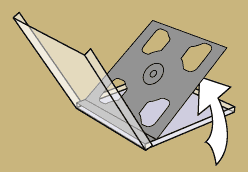
Look for your Video Workshop CD in the CD holder your application CD(s) came in.
If you purchased Photoshop as a stand alone product, your Video Workshop CD is located in the bottom tray of your CD holder, below the Adobe Photoshop CS2 application CD.
These video tutorials require that QuickTime 5.0.2 or later be installed on your computer. If you do not have QuickTime on your computer, or you need an update, please visit the QuickTime download page at http://www.apple.com/quicktime/download/qtcheck/.
If you purchased Adobe Photoshop CS2 from the Adobe Store as an Electronic Software Download or through a Windows Tryout, you can download your Total Training Video Workshop content by visiting the URL listed on your receipt page and receipt e-mail. If you are a licensing customer or a customer who did not receive CD’s with your purchase, you can purchase a copy of the Total Training Video Workshop CD by contacting Adobe Customer Service directly at 800-833-6687. Customers outside the United States and Canada, please call the nearest Adobe Customer Service for further assistance in purchasing this CD.
For technical support on issues related to the Total Training Video Workshop CD, please visit the Total Training Support page at http://www.totaltraining.com/Support/index.html. You can also e-mail support@totaltraining.com or call 1-760-516-9000 (available 8:00am and 5:00pm PST Monday-Friday).
For inquiries about volume licensing and other sales of the Total Training Video Workshop CD, please e-mail sales@totaltraining.com or call 1-888-368-6825 (toll-free in the US).
02/23/2005